How to Transfer EPF Money Through UPI: Latest Updates, Eligibility & Step-by-Step Process: The Employees’ Provident Fund (EPF) is one of India’s most important retirement savings schemes for salaried employees. Millions of EPFO members regularly withdraw or transfer their PF balance when changing jobs or meeting financial needs.
As of July 2026, you cannot directly transfer your EPF balance to a UPI app (such as Google Pay, PhonePe, or Paytm). However, the government has completed testing for UPI-based EPF withdrawals, and the feature is expected to roll out under EPFO 3.0
Also Read: PM Kisan Yojana 2026: Complete Guide to Pradhan Mantri Kisan Samman Nidhi Scheme
What Is EPF?
The Employees’ Provident Fund (EPF) is a retirement savings scheme managed by the Employees’ Provident Fund Organisation (EPFO). Both employers and employees contribute a fixed percentage of the employee’s salary every month.
The accumulated amount earns annual interest and can be withdrawn under specific conditions such as retirement, unemployment, medical emergencies, home purchase, education, or marriage.
Why Is EPFO Introducing UPI Payments?
The introduction of UPI aims to make EPF withdrawals:
- Faster claim settlements
- Easy digital verification
- Secure payment processing
- Instant fund transfers
- Better user experience
- Reduced paperwork
The initiative is part of EPFO’s ongoing effort to digitize its services.
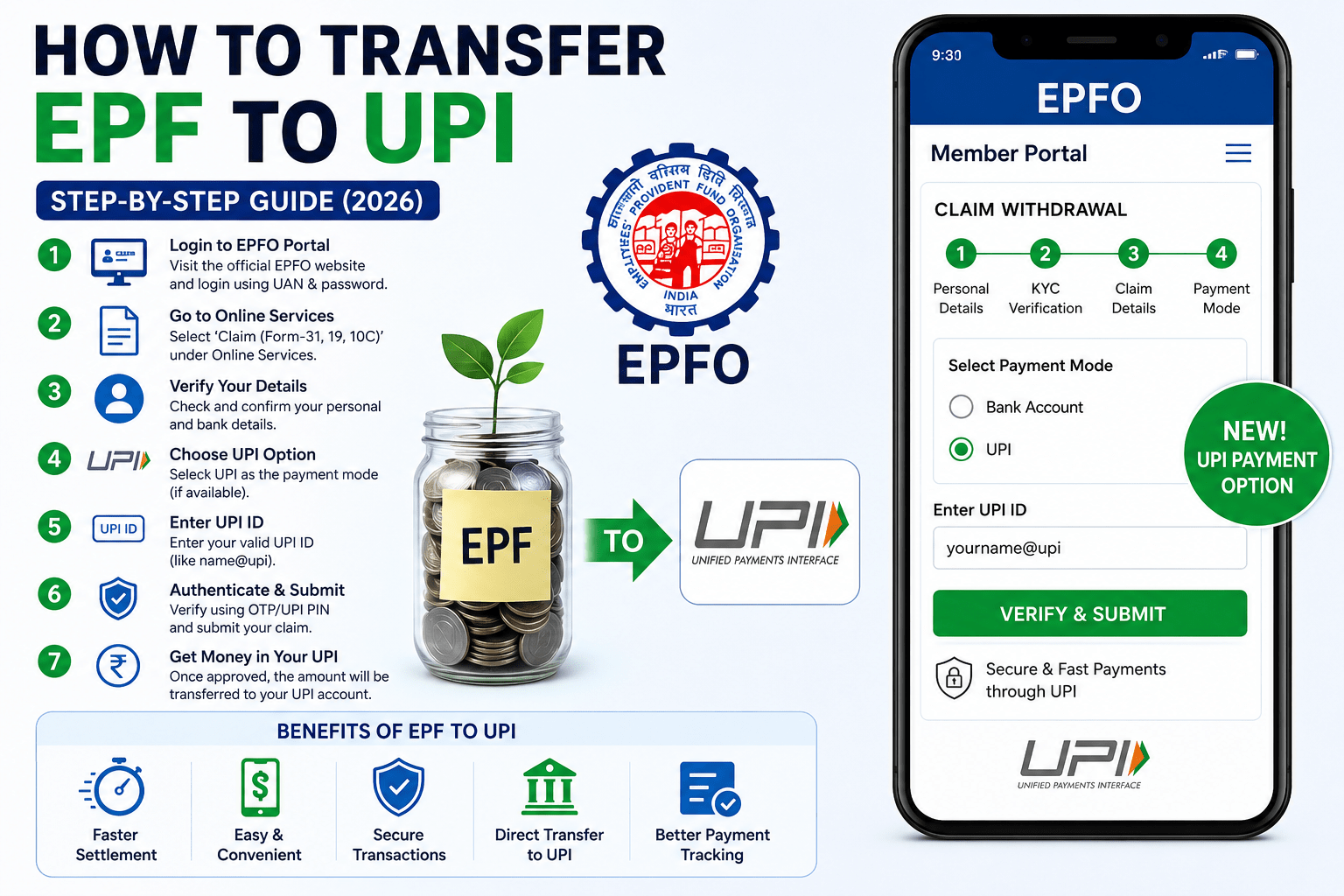
How to Transfer EPF Money Through UPI
If the UPI option is available for your EPFO account, follow these steps:
Step 1: Log in to the EPFO Member Portal
Visit the official EPFO Member Portal and sign in using your Universal Account Number (UAN) and password.
Step 2: Verify Your KYC
Ensure the following are linked and verified:
- Aadhaar
- PAN
- Bank account
- Mobile number
Step 3: Go to Online Services
Select Online Services and choose Claim (Form-31, Form-19 & Form-10C).
Step 4: Verify Your Details
Confirm your personal details and bank information.
Step 5: Choose UPI (If Available)
If your account supports the new payment method, select UPI as the preferred payment option.
Step 6: Enter Your UPI ID
Provide your registered UPI ID carefully.
Step 7: Authenticate
Complete the verification process using the OTP or UPI authentication.
Step 8: Submit Your Claim
After successful verification, submit the claim.
Once approved, the money will be transferred through the selected payment method.
Eligibility for EPF Withdrawal
You may withdraw your EPF balance under various circumstances, including:
- Retirement
- Resignation
- Unemployment
- Medical treatment
- Higher education
- Marriage expenses
- Home purchase or construction
- Home loan repayment
Eligibility depends on EPFO rules and the purpose of withdrawal.
Documents Required
Keep the following documents updated:
- UAN
- Aadhaar Card
- PAN Card
- Registered mobile number
- Active bank account
- Verified KYC
- UPI ID (if applicable)
Benefits of Receiving EPF Through UPI
Some expected advantages include:
- Faster payment processing
- Easy digital transactions
- Better payment tracking
- Secure authentication
- Reduced banking delays
- Convenient access from anywhere
Common Reasons for Claim Rejection
Your EPF withdrawal request may be delayed or rejected if:
- Aadhaar is not linked
- Bank details are incorrect
- PAN is not verified
- KYC is incomplete
- Employer has not approved required records
- Incorrect claim type is selected
Always verify your information before submitting the application.
Tips for Faster EPF Withdrawal
- Complete KYC verification.
- Ensure your Aadhaar and PAN are linked.
- Keep your mobile number active.
- Verify your bank account details.
- Use the correct withdrawal form.
- Regularly check your claim status online.
FAQ’s
Can I transfer my EPF money directly to Google Pay?
If EPFO has enabled UPI withdrawals for your account, you may be able to use a UPI ID linked to supported apps such as Google Pay, PhonePe, or Paytm. Otherwise, funds are credited to your registered bank account.
Is UPI withdrawal available for every EPFO member?
The feature may be rolled out in phases. Availability depends on EPFO’s implementation and your account eligibility.
Is Aadhaar mandatory?
Yes. Aadhaar linking and KYC verification are generally required for online EPF services.
How long does EPF withdrawal take?
Processing time varies depending on verification and claim approval. Digital claims are generally processed faster than offline applications.
Can I withdraw my full EPF balance?
Yes, subject to EPFO withdrawal rules and eligibility conditions.
Final Thoughts
The integration of UPI with EPF services marks another important step toward digital banking in India. As the feature becomes widely available, EPFO members can expect quicker and more convenient withdrawals with secure digital authentication.
Before submitting your claim, make sure your KYC is complete, your bank details are accurate, and your UAN is active. Staying updated with the latest EPFO announcements will help you take full advantage of new digital services as they become available.
With continued modernization, EPF withdrawals are expected to become faster, simpler, and more user-friendly for millions of employees across the country.