SAP MM, SAP PM & Store Transaction Codes: Complete T-Code List and Process Guide: If you work in procurement, stores, inventory, mechanical maintenance, plant maintenance, or materials management, learning the most important SAP transaction codes can make your daily work much easier.
SAP MM and SAP PM are closely connected in manufacturing and maintenance organisations. A maintenance breakdown may require a spare part; the spare may need to be checked in stock, reserved, issued to a maintenance order, or purchased if it is unavailable.
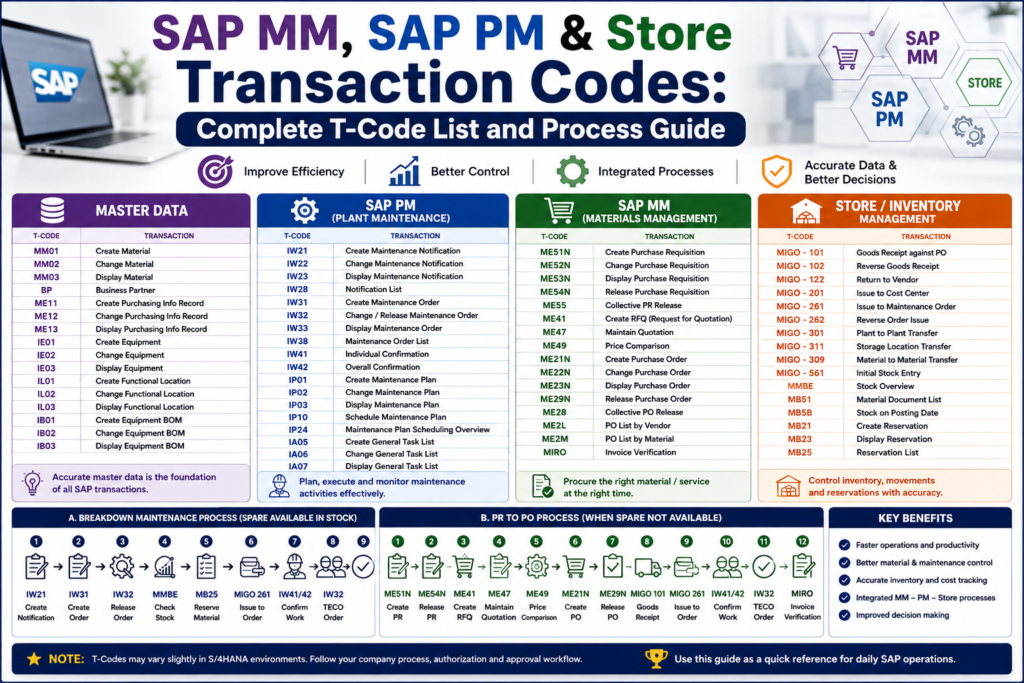
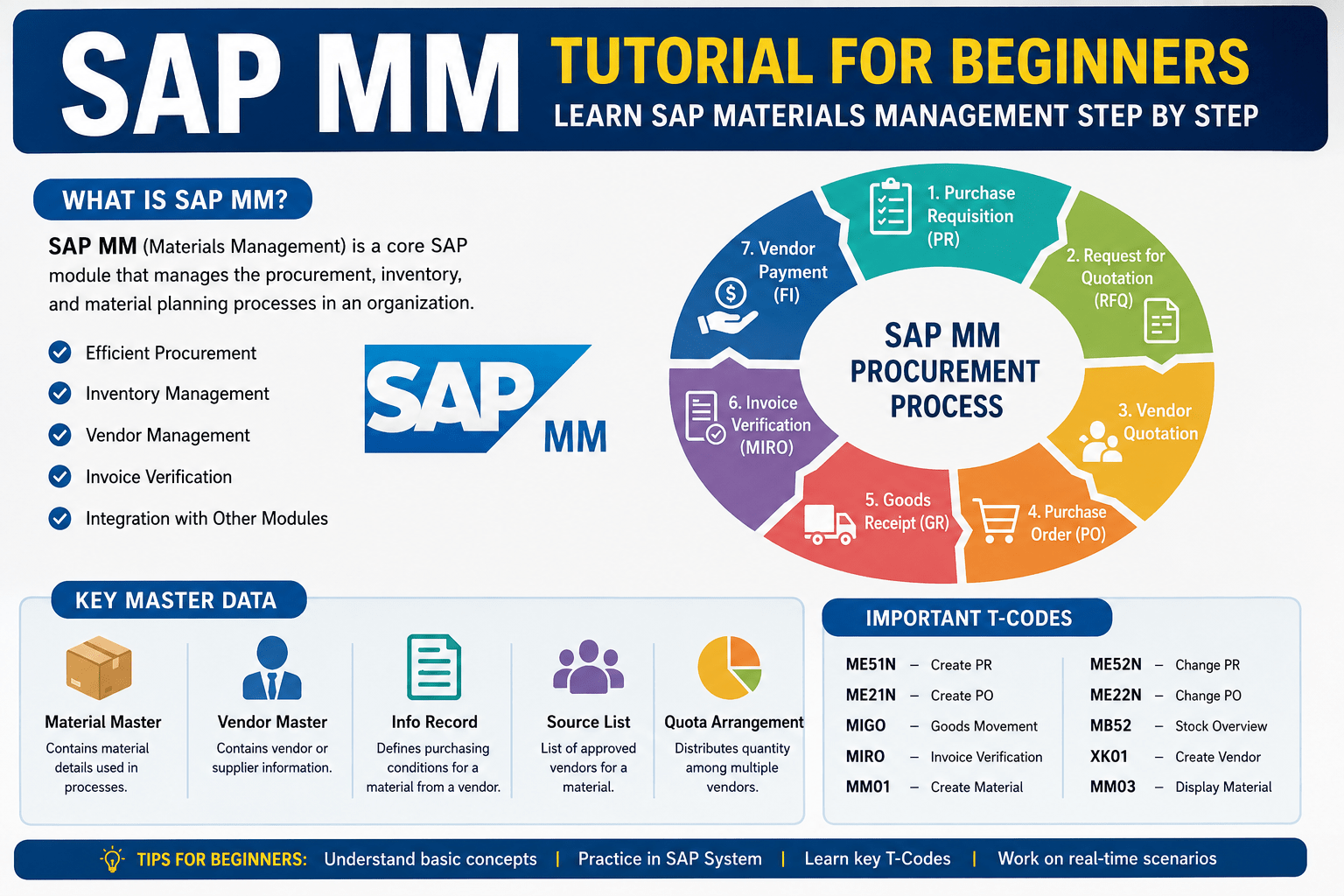
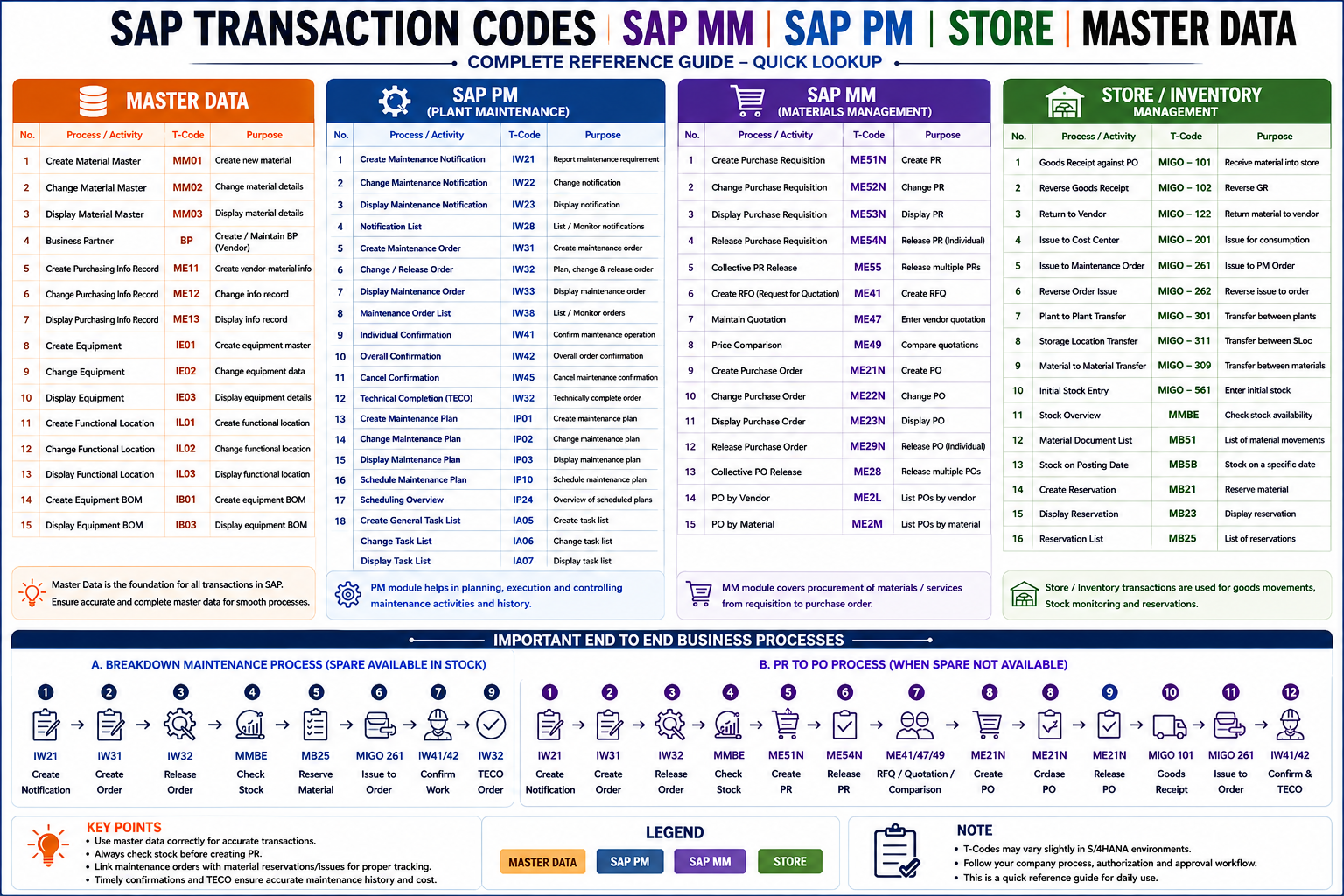
This guide covers the important SAP MM transaction codes, SAP PM T-codes, Store/Inventory transaction codes, and master data transaction codes in an easy-to-understand sequence.
What Is an SAP Transaction Code?
An SAP transaction code, commonly called a ‘T-Code’, is a shortcut used to access a particular transaction or function in SAP GUI.
For example:
- MM01 – Create Material
- MM03 – Display Material
- ME51N – Create Purchase Requisition
- ME21N – Create Purchase Order
- MIGO – Goods Movement
- IW21 – Create Maintenance Notification
- IW31 – Create Maintenance Order
- IW32 – Change Maintenance Order
- IW41 – Maintenance Confirmation
Instead of navigating through several menus, an authorised SAP user can enter the relevant transaction code directly.
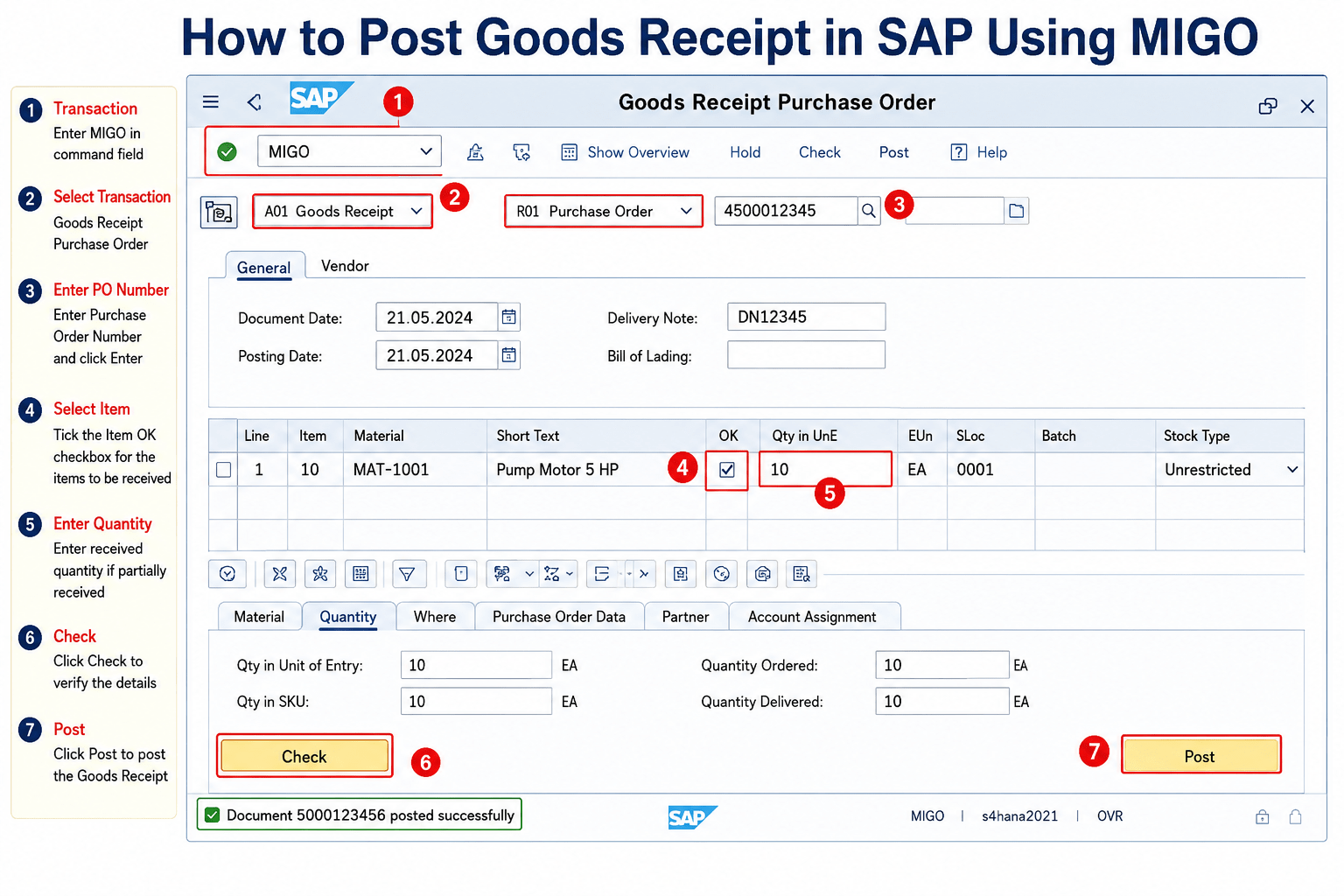
Also Read: How to Post Goods Receipt in SAP Using MIGO (Step-by-Step Guide)
Affiliate Link
🚀 Enrol in Live SAP Courses:
🎓 SAP SD (Sales and Distribution)
🎓 SAP MM (Material Management)
🎓 SAP MM (Material Management)
SAP Master Data Transaction Codes
Master data is the foundation of many SAP business processes. Correct material, equipment, functional-location and supplier information improves the reliability of procurement, inventory and maintenance transactions.
| T-Code | Transaction |
|---|---|
| MM01 | Create Material |
| MM02 | Change Material |
| MM03 | Display Material |
| BP | Business Partner |
| ME11 | Create Purchasing Info Record |
| ME12 | Change Purchasing Info Record |
| ME13 | Display Purchasing Info Record |
| IE01 | Create Equipment |
| IE02 | Change Equipment |
| IE03 | Display Equipment |
| IL01 | Create Functional Location |
| IL02 | Change Functional Location |
| IL03 | Display Functional Location |
| IB01 | Create Equipment BOM |
| IB02 | Change Equipment BOM |
| IB03 | Display Equipment BOM |
Why Is Master Data Important?
Consider a maintenance team that needs a bearing for a critical gearbox.
If the bearing has a properly maintained material master, the team can identify the correct material number, check its availability and use it in procurement and inventory processes.
Likewise, equipment and functional-location master data help maintenance teams identify exactly which asset and location require maintenance.
Download PDF of Transaction Code
SAP MM Transaction CodesSAP MM Transaction Codes
SAP Materials Management supports important procurement and material-related processes.
One of the most common procurement cycles is:
Requirement → Purchase Requisition → Approval → RFQ/Quotation → Purchase Order → Goods Receipt → Invoice
Important SAP MM T-Codes
| T-Code | Transaction |
|---|---|
| ME51N | Create Purchase Requisition |
| ME52N | Change Purchase Requisition |
| ME53N | Display Purchase Requisition |
| ME54N | Release Purchase Requisition |
| ME55 | Collective PR Release |
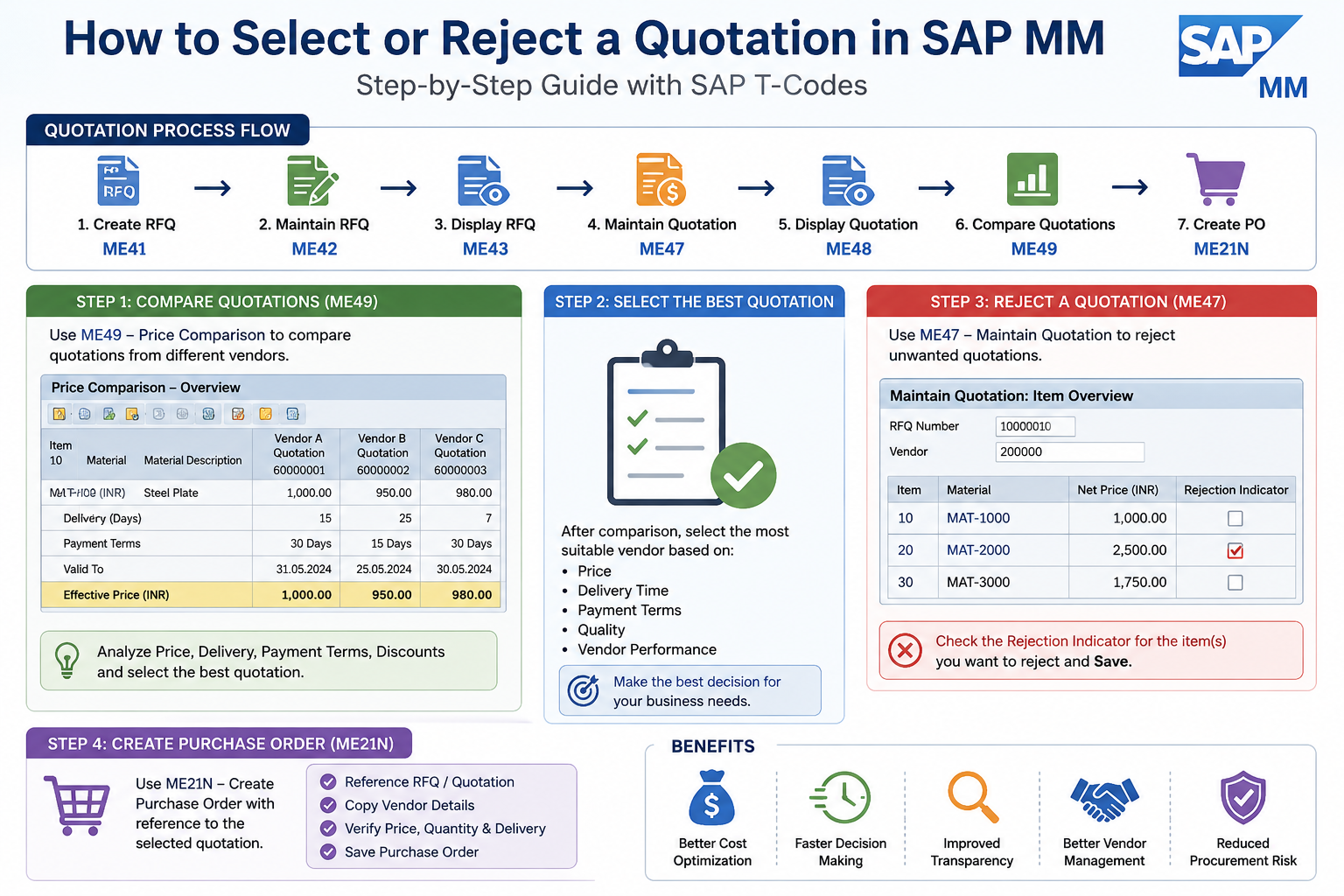
| ME41 | Create RFQ |
| ME47 | Maintain Quotation |
| ME49 | Price Comparison |
| ME21N | Create Purchase Order |
| ME22N | Change Purchase Order |
| ME23N | Display Purchase Order |
| ME29N | Release Purchase Order |
| ME28 | Collective PO Release |
| ME2L | Purchase Orders by Vendor |
| ME2M | Purchase Orders by Material |
| ME2N | Purchase Order List |
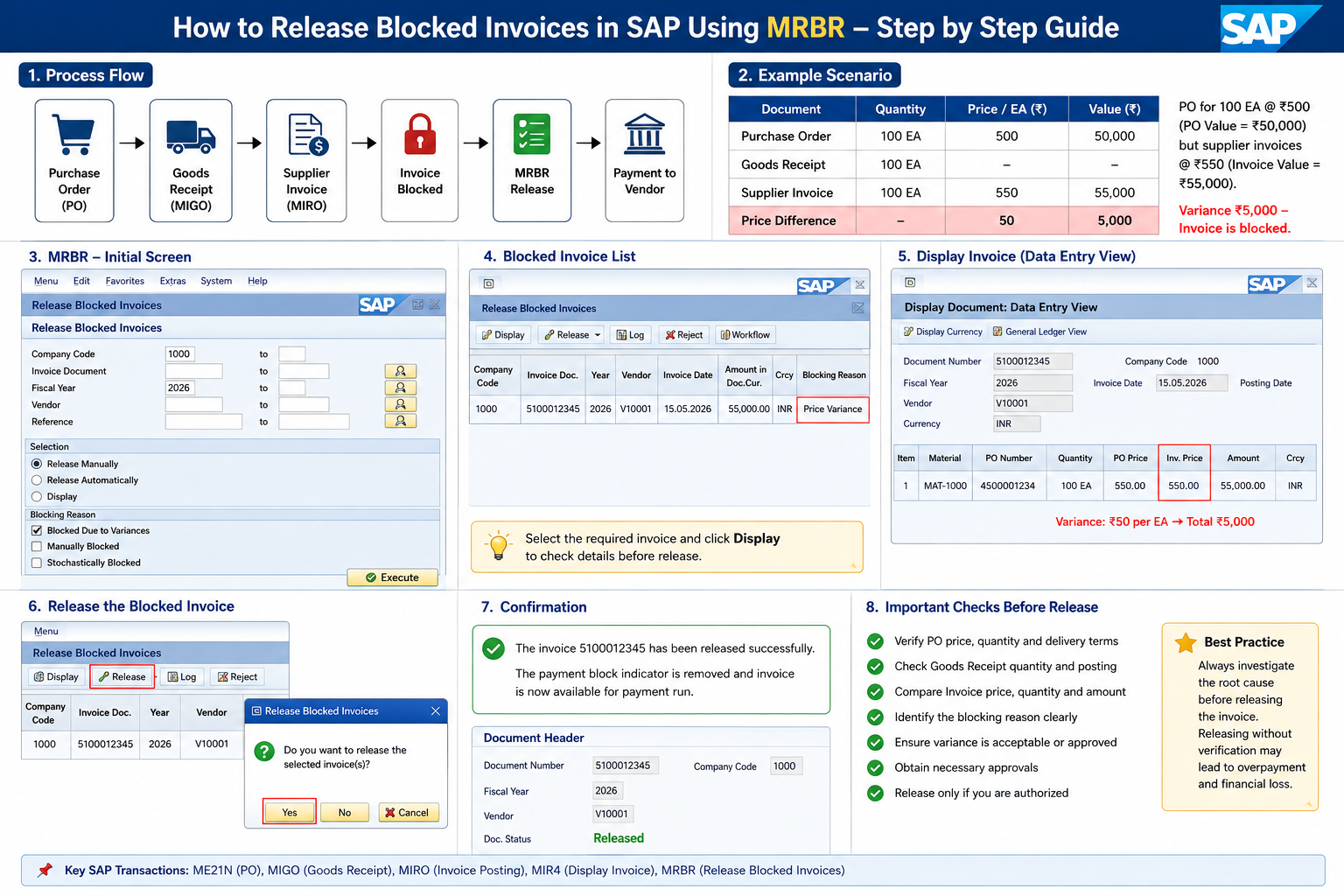
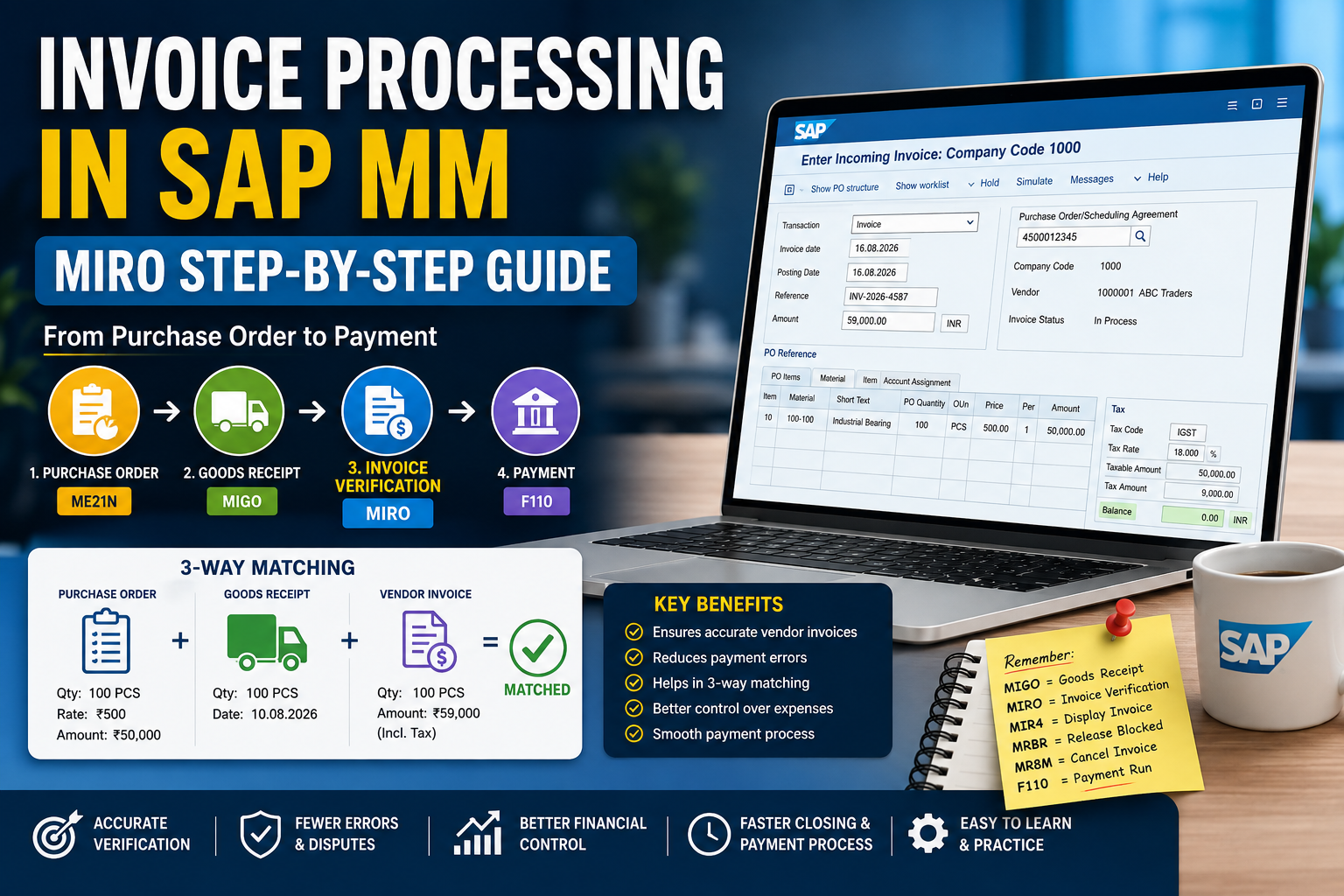
| MIRO | Invoice Verification |
PR to PO Process in SAP MM
A common sequence is:
ME51N → ME54N → ME41 → ME47 → ME49 → ME21N → ME29N
Not every company uses every step. For example, an RFQ and quotation comparison may not be required for every purchase.
ME51N – Create Purchase Requisition
A Purchase Requisition, or PR, represents an internal requirement for a material or service.
Example:
A maintenance department needs two bearings for a gearbox overhaul.
The requirement can be raised through a PR and then processed according to the organization’s purchasing workflow.
ME21N – Create Purchase Order
After the purchasing process and required approvals, a Purchase Order can be created.
The PO becomes a key procurement document between the organization and supplier.
ME23N – Display Purchase Order
ME23N is one of the most useful transactions for users who need to check PO information without changing it.
It can help users review purchase-order information and procurement status.
SAP Store and Inventory Transaction Codes
Store personnel regularly handle goods receipts, goods issues, reservations, transfers and stock monitoring.
SAP documentation describes MIGO as a goods-movement transaction used for activities including goods receipts, goods issues and transfer postings.
Important Store T-Codes
| T-Code | Transaction / Use |
|---|---|
| MIGO | Goods Movement |
| MMBE | Stock Overview |
| MB51 | Material Document List |
| MB5B | Stock on Posting Date |
| MB21 | Create Reservation |
| MB22 | Change Reservation |
| MB23 | Display Reservation |
| MB25 | Reservation List |
Important Movement Types
| Movement Type | Purpose |
|---|---|
| 101 | Goods Receipt against PO |
| 102 | Reversal of 101 |
| 122 | Return Delivery to Vendor |
| 201 | Goods Issue to Cost Center |
| 261 | Goods Issue to Order |
| 262 | Reversal of 261 |
| 301 | Plant-to-Plant Transfer |
| 309 | Material-to-Material Transfer |
| 311 | Storage Location Transfer |
| 561 | Initial Stock Entry |
Why Is MIGO Important?
MIGO is one of the most useful inventory transactions because goods movements affect physical inventory records.
SAP’s current S/4HANA documentation identifies MIGO and related goods-movement transactions for goods receipts, goods issues and transfer postings.
For maintenance personnel, goods issue to an order is particularly important because it connects spare-parts consumption with the relevant work/order.
SAP PM Transaction Codes
SAP Plant Maintenance, now commonly discussed within SAP Asset Management in S/4HANA contexts, supports the planning, execution and recording of maintenance activities.
Important SAP PM T-Codes
| T-Code | Transaction |
|---|---|
| IW21 | Create Maintenance Notification |
| IW22 | Change Maintenance Notification |
| IW23 | Display Maintenance Notification |
| IW28 | Notification List |
| IW31 | Create Maintenance Order |
| IW32 | Change Maintenance Order |
| IW33 | Display Maintenance Order |
| IW38 | Maintenance Order List |
| IW41 | Create PM Confirmation |
| IW42 | Overall Confirmation |
| IW45 | Cancel Confirmation |
| IP01 | Create Maintenance Plan |
| IP02 | Change Maintenance Plan |
| IP03 | Display Maintenance Plan |
| IP10 | Schedule Maintenance Plan |
| IP24 | Maintenance Scheduling Overview |
| IA05 | Create General Maintenance Task List |
| IA06 | Change General Task List |
| IA07 | Display General Task List |
SAP documentation identifies IW31, IW32 and IW33 with creating, changing and displaying maintenance orders. It also identifies IW21 for notifications and IW41 for PM confirmation.
SAP Breakdown Maintenance Process
Suppose a pump suddenly breaks down.
A practical process could be:
Breakdown Identified
↓
IW21 – Create Maintenance Notification
↓
IW31 – Create Maintenance Order
↓
IW32 – Plan/Release Order
↓
MMBE – Check Spare Stock
↓
Reservation / MB25 – Check Requirement
↓
MIGO – Issue Material to Order
↓
IW41/IW42 – Confirm Maintenance Work
↓
IW32 – Technical Completion
This creates a structured link between the equipment problem, maintenance work and spare-parts consumption.
What Happens When the Spare Part Is Not Available?
This is where the integration between SAP PM, MM and Stores becomes especially important.
Consider a gearbox breakdown where a required bearing is out of stock.
The process may become the following.
IW21 – Maintenance Notification
↓
IW31 – Maintenance Order
↓
IW32 – Order Planning/Release
↓
MMBE – Check Stock
↓
ME51N – Create PR
↓
ME54N – Release PR
↓
ME41/ME47/ME49 – RFQ and Quotation Process, if required
↓
ME21N – Create PO
↓
ME29N – Release PO
↓
MIGO – Goods Receipt
↓
Material Available in Store
↓
MIGO – Issue Material to Maintenance Order
↓
IW41/IW42 – Maintenance Confirmation
↓
IW32 – Technical Completion
This is an excellent example of how different SAP functions work together rather than independently.
SAP Preventive Maintenance Process
Corrective maintenance starts after a problem occurs. Preventive maintenance aims to perform planned work at defined intervals or according to maintenance strategies.
Important transactions include:
IA05 → IP01 → IP10 → Maintenance Order → Execution → Confirmation → Completion
IP01 – Create Maintenance Plan
Used to create a maintenance plan.
IP10 – Schedule Maintenance Plan
Used in maintenance-plan scheduling.
IA05 – Create General Maintenance Task List
A task list can standardise recurring maintenance operations.
For example, a pump preventive maintenance task list might include the following:
- Check vibration.
- Inspect coupling.
- Check bearing condition.
- Inspect mechanical seal.
- Check lubrication.
- Verify alignment.
- Record observations.
Standardised task lists can make recurring maintenance planning more consistent.
Why Are SAP MM, PM and Store T-Codes Important?
1. Faster SAP Navigation
Knowing frequently used transaction codes allows experienced users to reach required functions quickly.
Instead of searching through menus every time, users can directly open transactions such as MMBE, ME23N, IW33 or MIGO.
2. Better Spare-Parts Management
Maintenance depends heavily on spare availability.
With appropriate SAP transactions, users can follow a process such as:
Identify Spare → Check Stock → Reserve → Issue → Track Consumption
This improves visibility of maintenance materials.
3. Better Breakdown Management
Maintenance notifications and orders create a structured way to record equipment problems and maintenance activities.
This provides much better traceability than managing breakdown information only through phone calls, paper records or informal messages.
4. Better Procurement Control
When a spare is unavailable, SAP MM provides a controlled procurement process:
PR → Approval → Supplier Selection → PO → Goods Receipt → Invoice
This helps organizations maintain documentation and purchasing history.
5. Maintenance Cost Visibility
Connecting spare-parts consumption and external procurement to maintenance orders helps organizations understand the resources consumed by maintenance activities.
This can support questions such as:
Which equipment consumes the most spare parts?
Which machines require frequent maintenance?
Where is maintenance spending increasing?
6. Improved Maintenance History
Maintenance notifications, orders and confirmations provide historical information that can support future maintenance decisions.
Instead of only knowing that a machine was repaired, users can build a record of the problem and maintenance work performed.
7. Better Coordination Between Departments
SAP connects several teams:
Maintenance → Stores → Purchase → Supplier → Accounts
A maintenance engineer identifies the requirement, stores checks material availability, purchasing procures unavailable materials, stores receives them, maintenance consumes them, and finance processes the supplier invoice.
Most Important SAP T-Codes to Remember
For beginners, learning every SAP transaction code at once is unnecessary.
Start with these frequently useful transactions:
MM01 – Create Material
MM03 – Display Material
MMBE – Stock Overview
ME51N – Create PR
ME53N – Display PR
ME21N – Create PO
ME23N – Display PO
MIGO – Goods Movement
MB51 – Material Document List
IW21 – Create Maintenance Notification
IW31 – Create Maintenance Order
IW32 – Change Maintenance Order
IW33 – Display Maintenance Order
IW38 – Maintenance Order List
IW41 – Maintenance Confirmation
IP01 – Create Maintenance Plan
IP10 – Schedule Maintenance Plan
MIRO – Invoice Verification
SAP MM + PM + Store Process at a Glance
For mechanical maintenance professionals, one of the most useful sequences to understand is:
Equipment Breakdown → Notification → Maintenance Order → Stock Check → Reservation → Material Issue → Maintenance Execution → Confirmation → Technical Completion
When material is unavailable:
Equipment Breakdown → Notification → Maintenance Order → Stock Check → PR → Approval → PO → Goods Receipt → Store → Material Issue → Maintenance → Confirmation → Completion
Understanding the process behind the T-Code is more valuable than simply memorizing a list of transaction codes.
Conclusion
Learning SAP MM, SAP PM, Store and Master Data transaction codes is valuable for mechanical engineers, maintenance engineers, store professionals, procurement teams, material planners and SAP end users.
However, do not focus only on memorizing T-Codes.
Understand the complete business process:
Requirement → Planning → Stock Check → Procurement → Receipt → Material Issue → Maintenance → Confirmation → Completion
Once you understand this flow, individual SAP transaction codes become much easier to remember and use correctly.
Note: Available transactions, movement types, release procedures, authorizations and workflows vary by SAP version and company configuration. S/4HANA organizations may also use SAP Fiori apps alongside or instead of some classic SAP GUI transactions.